



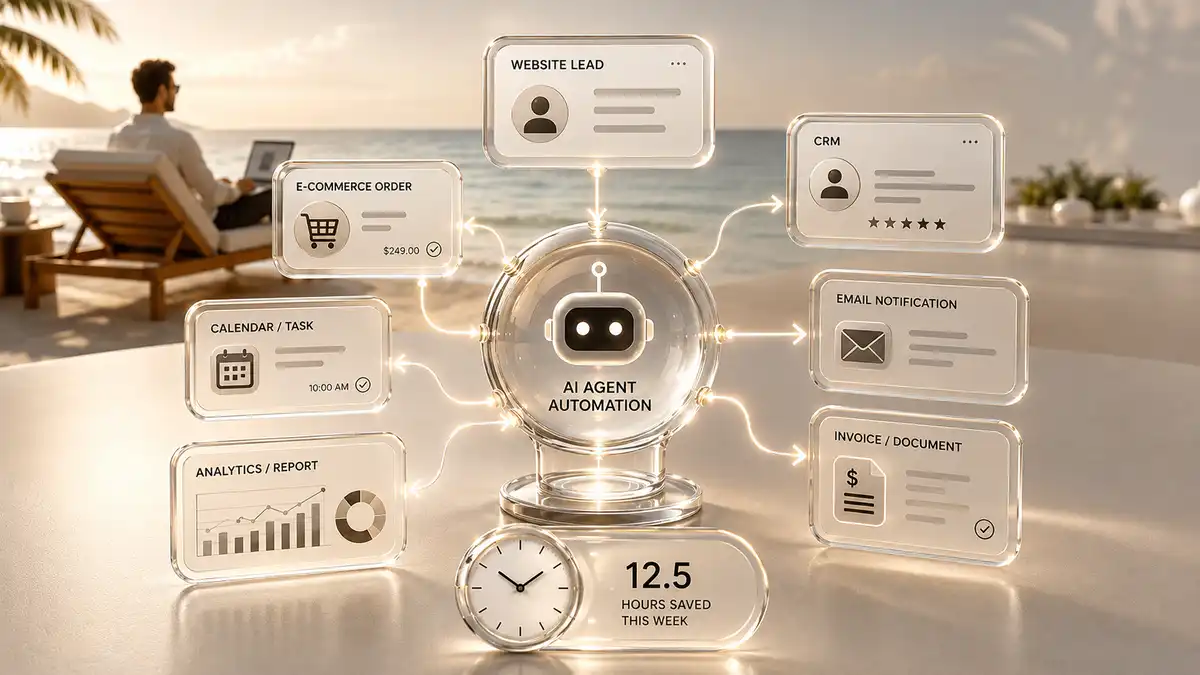
In many companies, employees repeat dozens of tasks every day that a connected system could handle. They copy orders from email into a CRM, send the same customer messages, create invoices, check statuses, move data between spreadsheets, compile reports and remind colleagues about tasks.
Each action takes only a few minutes and feels harmless. Repeat it dozens of times a day, hundreds of times a month and across several employees, and the business loses a serious amount of time.
Those losses usually remain invisible. Customers receive answers, orders move and managers fill in spreadsheets, so the process appears to be working.
In fact, employees spend a significant portion of their day not on sales, product development, or customer service, but on mechanically moving information between different systems.
Business automation removes that routine. It lets connected systems perform repetitive actions, pass data, send notifications, monitor statuses and trigger the next step without constant manual input.
That doesn’t necessarily mean a complex corporate platform, a huge budget, or a complete business overhaul. Sometimes one well-configured automation saves a company more time than implementing a large system that employees end up using almost nothing.
Business automation in plain English
Automation is a preconfigured process in which a particular event automatically triggers a sequence of actions.
For example, a customer submits a website form. The enquiry is saved in the CRM, the manager is notified, the customer receives confirmation, a task is created and the lead source is recorded for analysis.
Without automation, an employee must open the email, copy the customer’s contact details, create a CRM record, set a task, send a reply and remember to record the source.
The system completes the same steps in seconds and follows the same process for every enquiry.
Another example is related to the online store. After placing an order, the system can verify the payment, send the data to the CRM or ERP, create a document, transfer the information to the delivery service, notify the manager and send a confirmation letter to the customer.
An employee steps in only where judgement is genuinely needed.
That is the point of automation: software handles predictable sequences, while people focus on exceptions, communication, judgement and work that needs experience.
Where business loses time every day
The main losses are not due to one big problem, but to hundreds of small operations.
A manager receives a new enquiry and copies it into a spreadsheet. They send the standard presentation, check for a reply two days later and pass approved details to accounts. The accountant prepares an invoice, sends it back and the manager forwards it to the customer before updating the payment status.
Each participant in the process does their part. But between the stages there are many manual transmissions, messages and checks.
This may work while enquiries are few. As volume grows, the whole process starts relying on employees noticing every message and remembering every next step.
Someone forgets to move the enquiry. A task is never created. The customer misses the email. A phone number is copied incorrectly. The manager cannot see that an invoice has been paid. The report arrives late.
As a result, business is not only losing time. It loses reaction speed, control, and some customers.
This is especially noticeable in companies that simultaneously use a website, email, CRM, Google Sheets, instant messengers, an accounting program, a warehouse system and several ad accounts.
Each tool performs its function, but employees manually link them together.
Automation creates bridges between these systems.
Why a few minutes turn into hundreds of hours
Suppose handling one enquiry takes a manager an extra seven minutes: opening the message, transferring data, creating a record, replying and setting a task.
At twenty enquiries a day, that's 140 minutes of manual work.
In twenty working days, the company loses more than 46 hours only for the initial processing of enquiries. If multiple managers are involved, hundreds of hours may be involved by the end of the year.
And this is just one operation.
Added to it are the preparation of documents, reports, reminders, status updates, transfer of information to other departments and search for data in different systems.
The problem is that businesses rarely consider these actions separately. They are seen as a normal part of the working day.
But the cost of the process can be measured.
If an employee spends 40 hours a month on repetitive administration, the company pays for a full working week that creates no new value. That time could go into negotiation, sales, key accounts or product development.
Automation gives business that time back.
What processes can be automated
Automation potential exists in almost every department. It is important not to try to automate the entire company at once, but to find the processes with the most repetitions and errors.
In sales, automation can assign enquiries, create tasks, schedule follow-ups, send material and update deal stages.
In marketing, it can collect data from ad accounts, generate reports, transfer leads to CRM, segment the audience and start communication after certain user actions.
The online store automates orders, notifications, invoices, balances, delivery, payment statuses, product feeds and messages to customers.
In a service company, the system can capture an enquiry, categorise it, assign the right employee, monitor response time and keep the customer updated.
Within the company, automation helps coordinate documents, create tasks after meetings, collect reports, notify employees, and synchronize data between departments.
Even content preparation can involve automated processes. For example, a new idea from Telegram is saved in the database, the voice message is decrypted, AI structures the material, and the task appears in the content plan.
The goal is not to remove people. It is to remove the steps where human involvement adds no value.
Example: Automation of enquiry handling
Consider the usual website enquiry.
Without automation, the enquiry lands in an inbox. A manager must notice it, check the details, create a CRM record, add context, contact the person and record the outcome.
If the manager is busy, the enquiry can wait several hours.
In an automated process, everything happens differently.
With automation, the form data enters the CRM immediately. The system records the source, creates a deal, assigns an owner and posts a notification in the team channel. The customer receives confirmation, while an overdue response triggers a reminder or escalation.
The workflow can also validate the phone number, detect the enquiry language, segment the customer by service and send relevant material.
The company responds faster, retains the data and gains a transparent history of every action.
The customer may not even know that part of the process is automated. It just gets fast and consistent service.
Speed of reaction directly affects sales
In some sectors, customers contact several companies at once.
The winner is not always the cheapest or even the strongest product. Sometimes it is simply the company that responds first and guides the buyer confidently to the next step.
If the enquiry is in the mail for several hours, the business loses its advantage.
Automation does not replace a good sales conversation, but it starts the interaction immediately. The customer receives confirmation, useful information or a choice of consultation times.
The manager at the same time sees all the necessary data and understands the context of the enquiry.
This is especially important for advertising. A company can pay for each click and lead, but lose some of the result due to slow internal processing.
In that case, marketing did its job. The internal process failed to continue the conversation quickly enough.
Automation reduces the number of errors
Mistakes do not happen only through inexperience. Fatigue, workload and constant context switching create them too.
An employee may incorrectly copy an address, forget to attach a document, choose an incorrect status, or send information to the wrong person.
If the action is performed by the system according to a pre-tested scenario, the probability of such errors is significantly reduced.
For example, an invoice can be generated from order data without a manager retyping the company name, amount and billing details.
The system can check the completion of mandatory fields, prevent you from moving to the next stage without the necessary information and notify the employee of inconsistencies.
This does not mean that automation completely eliminates errors. An incorrectly configured process can scale a problem faster than a person.
Automation must be designed, tested and monitored. Once configured properly, it makes repetitive operations far more reliable.
Automation does not always require replacing existing systems.
Many entrepreneurs put off automation because they think they’ll have to change their CRM, website, accounting program, and tools.
In many cases, this is not required.
Modern systems can be connected through APIs, webhooks and automation platforms. Data can move between a website, CRM, Google Sheets, Telegram, email, calendars, payment providers and other services.
A company can keep its existing website and CRM while automating order transfers between them. It can retain a familiar spreadsheet while filling it automatically, or keep its team messenger while adding alerts for critical events.
This lets the business improve one process at a time without disrupting daily operations.
Sometimes a company really needs a new system or deep custom development. But this becomes clear only after analyzing the current process.
Proper automation doesn’t start with a proposal to replace everything. First, you need to understand what tools are already working and where exactly time is lost.
Simple automation, integration and custom development
The word “automation” can hide solutions of different levels of complexity.
Simple automation usually covers a few actions. For example, a new enquiry creates a customer record and notifies the manager.
Integration connects two or more systems. An online store might send paid orders to accounting while warehouse stock levels flow back to the website.
A more complex process may involve multiple stages, conditions, checks, different employee roles, and exception handling.
A custom system makes sense when standard services cannot reflect the company’s business logic. That might be a B2B platform, customer portal, configurator, pricing engine or internal operations tool.
Not every business needs custom development. Often the desired effect can be obtained through a competent connection of existing solutions.
The main thing is that the chosen technology corresponds to the task.
A solution that is too simple will constrain the process. One that is too complex will add cost and frustrate employees.
Where AI Appears in Automation
Classical automation works according to predefined rules.
If a customer submits the form, create an enquiry. If the order is paid, send the document. If the manager has not responded, issue a reminder.
AI allows you to work with less structured information.
It can analyse enquiry text, identify the topic, extract data from documents, draft a response, classify the lead, process voice messages and summarise a conversation.
For example, a customer sends a long email describing the task. AI extracts the relevant service, budget, timeframe and contact details. Automation then creates a CRM deal and gives the manager structured context.
In support, AI can interpret a question, find relevant knowledge and prepare an answer. Complex issues are passed to a specialist with a concise summary.
AI makes automation more flexible, but it doesn’t eliminate the need for control.
In critical processes, decisions related to money, contracts, personal data, or non-standard situations must be verified by a person.
AI agent and conventional automation are not the same thing
Conventional automation follows a fixed scenario. It works well where the process is known in advance.
An AI agent is able to analyze a situation, select a tool and perform several actions depending on the context.
Conventional automation might send the same email to every new customer. An AI agent can interpret the enquiry, identify the business type, select suitable material and prepare a personalised response.
In the sales department, the agent can collect information about the company, briefly describe its activities, identify a potential need and prepare the manager for the first contact.
However, an AI agent should not be implemented just because it is a modern technology.
If a process can be reliably solved with simple automation, a complex AI scenario can be more expensive, slower, and less predictable.
A good architecture uses AI only where analysis, interpretation, or unstructured data is required.
Automation should not start with laying off employees.
One of the most common associations with automation is staff reduction.
In practice, the main value often lies not in firing people, but in improving their effectiveness.
A strong manager does not have to spend hours moving data between systems. A marketer does not have to manually collect the same reports. A support professional does not have to search for standard information in dozens of documents.
Automation frees employees from routine and allows them to use their knowledge where it is needed.
A company can handle more enquiries with the same team, serve customers faster and avoid proportionally increasing its administrative workload.
For a growing business, this is especially important. Without automation, increasing the number of orders often requires proportionate hiring of new employees.
With properly structured processes, a company can grow faster without increasing operating costs at the same rate.
Why automating chaos only makes chaos faster
Automating a poorly organized process is dangerous.
If employees do not know who owns an enquiry, which stages the customer moves through or where information belongs, technology will not solve the problem.
It will speed up the movement of data within an incomprehensible system.
Before automating, describe the process. What triggers it? Which data is required? Which actions follow? Where are decisions made? What counts as success? Which exceptions can occur?
Even at this stage, businesses often uncover needless approvals, duplicated work and steps that add no value.
Some problems are not solved by programming, but by simplifying the process itself.
Professional automation begins with business analysis. First, the team studies the existing order of work, then proposes a more logical model and then selects the tools.
How to choose the first process to automate
Don’t start with the idea of automating the entire company.
Large projects require time, budget and active employee involvement. If a business does not already have experience with automation, it is better to start with one clear process.
A good candidate meets several criteria.
It often repeats itself, follows a similar scenario, takes a noticeable amount of time, and creates errors or delays.
Examples include handling enquiries, preparing documents, transferring orders, compiling reports and sending status notifications.
It is important that the result can be measured.
How long did the process take before? How often did errors occur? How many enquiries were lost? How quickly did employees respond?
After the introduction of automation, these indicators can be compared.
The company then gains a measurable business result, not an abstract feeling of innovation.
What a sound automation rollout looks like
The first step is to study the current process.
The team communicates with employees, looks at which systems are being used, how data is being transmitted and where delays occur.
Analyse the work as it really happens, not merely the official process. On paper an enquiry may go straight to a manager; in practice, employees may forward it repeatedly in a team chat.
After analysis, a diagram of the future process is created. Events, actions, conditions, responsible employees and exceptions are defined.
Only then do we choose the tools: CRM configuration, an integration platform, an AI service, a bespoke module or a sensible combination of them.
Once developed, the process is tested on real-world scenarios.
It is necessary to check not only the ideal situation, but also the mistakes. What happens if the customer does not specify the phone? If the external system is not available? If the order was paid twice? What if the data came in an unexpected format?
After launch, it is important to monitor the work of automation, collect employee feedback and gradually improve the logic.
Automation is part of a living business, so it has to evolve.
Why Employees Can Resist Automation
Even a useful system can cause distrust.
Employees are used to a certain order of work. The new process seems complex, opaque or threatening to their role.
If the team doesn’t understand why automation is being implemented, it can continue to work on the old scheme, duplicate data manually, or bypass the new system.
Therefore, implementation should include training.
Employees need to show what activities will disappear, what will remain under their control, and how the system will help them work faster.
It is also important to take into account their real experience. Employees often know best where the process breaks down and what exceptions arise.
Automation created without their involvement may seem logical to the manager, but uncomfortable in daily work.
Technology only starts to work when the team actually uses it.
How to evaluate the economics of automation
Automation should solve a specific business problem.
The easiest way to evaluate is to calculate the time saved.
It is necessary to determine how many employees participate in the process, how many times it is repeated and how many minutes it takes one execution.
For example, three employees spend 30 minutes each day preparing reports. This is 1.5 hours a day and about 30 hours a month.
If automation shortens the process to verify the finished report, the company returns a significant portion of that time.
But the economic impact is not limited to working hours.
The calculation should also include fewer errors, faster customer responses, more enquiries handled, less dependence on individual employees and better visibility.
Sometimes automation doesn’t reduce direct costs, but it helps a company get more sales from the same team.
In other cases, it reduces the risk of an expensive error, such as a lost order, an incorrect bill, or a missed payment.
Therefore, payback should be considered in the context of a particular process.
When automation may not pay off
Not every process makes sense to automate.
If the action is performed several times a year and the development of a complex system requires a significant budget, manual work can remain economically reasonable.
Automation is also inefficient if the process is constantly changing and the business does not yet understand how it should work.
Otherwise, the system will need constant reworking.
The problem may also be the absence of a process owner. If no one within the company is responsible for the outcome, automation will quickly cease to match the actual work.
Be careful about solutions that promise to automate everything with a single button. The more complex a business is, the more attention is required to its logic, exceptions, and data.
Good automation may look simple to the user, but behind that simplicity there must be a thoughtful system.
Security and access
Automation often works with customer data, documents, payments, and internal company information.
Therefore, it is necessary to determine in advance what data is transferred between services, where it is stored and who has access to it.
You cannot uncontrollably connect random tools to a CRM, email or accounting system.
It is important to use secure connections, restrict access rights, store keys and passwords securely, and disable former employees or contractors.
For critical processes, it is useful to keep an action log. The company must understand when the system has changed data, sent a message or created a document.
Backup scenarios should also be envisaged.
What happens if a service is temporarily unavailable? Is the enquiry retained? Will the action retry after recovery? Does the responsible person receive an alert?
Reliable automation takes into account not only normal operation, but also possible failures.
Why Businesses Need Control, Not a Black Box
The owner does not need to understand every technical detail, but should understand the overall logic.
What systems are connected? What data is being transmitted? Who gets the notifications? Where is the history kept? What to do if you make a mistake?
If the process is completely dependent on the contractor and inside the company no one understands the device, there is a risk.
Otherwise, the business may eventually lose track of why an enquiry reaches one manager, who can change the logic and what happens if a service is switched off.
Automation needs to be documented.
Documentation need not run to hundreds of technical pages. A clear process diagram, integration list, access map and description of the main scenarios may be enough.
This simplifies support and protects the company from dependence on one specialist.
From individual automation to a single digital system
In the first phase, a business usually automates individual actions.
Enquiries enter the CRM. Orders move to accounting. Reports compile automatically. Notifications arrive in Telegram.
Over time, these processes begin to form a single digital infrastructure of the company.
Website, advertising, CRM, sales, documents, analytics and communication cease to exist separately.
Data goes through the entire system without constant manual copying.
Leaders gain a current view of the business. Sales sees the customer history. Marketing understands which sources drive revenue. Accounts receives accurate documents. Customers move from enquiry to outcome faster.
Automation is not just a way to save a few hours.
It creates the basis for scaling the company.
A business can handle more customers, launch new directions faster, and maintain control as it grows.
Checklist: what the company should check now
Automation is a way to restore business time
The main resource of automation is not in fashionable technologies.
It gives back to the company the time employees spend on repetitive operations every day.
The reclaimed time can go into sales, product development, customer service, team training and new projects.
In addition, businesses get faster processes, fewer errors, and more transparency.
Automation should not complicate the company. A well-built system makes the work more understandable.
Employees know what follows their action, managers can see the process state and customers receive fast, consistent service.
It’s not about buying an AI platform or trying to automate everything.
You need to find one process that regularly takes time, describe it, simplify it, and then choose the technology.
This is how automation transforms from a beautiful idea into a practical tool for growth.
Automation and AI solutions for business from Pump Agency
Pump Agency helps companies find the processes wasting time, enquiries and resources.
We do not begin by selling a particular tool. We analyse how the business works: the enquiry journey, data transfers, team responsibilities, existing systems and repetitive operations.
After that, we propose a solution that corresponds to the scale of the task.
The answer might be a simple website-to-CRM integration, automated enquiry handling, notifications, document generation, order synchronisation, connected analytics, an AI agent or a custom system.
For small tasks, one specific process can be automated. For a growing business, you can create a connected digital infrastructure that integrates website, sales, marketing, CRM, documents and internal processes.
Our goal is not to add another complex tool to the business.
Pump Agency’s mission is to eliminate unnecessary manual work, reduce errors and create a system that helps the company grow.
If employees repeat the same actions every day, transfer data between services and spend time on a process that can be described clearly, part of that work is already ready for automation.
Discuss automation